


AETools
A multipurpose utility bot for staff teams.
Introduction
Being used since 2022, the bot has many functions which are used constantly, every day.
Features
Commands
*IMPORTANT* All commands are used in Discord with slash ("/") except ++ which is used for relics, primes, and status.
Relic Viewing
Command Syntax: ++RELIC NAME or ++SHORTHAND
RELIC NAME
Examples: Axi L6, Lith G1
SHORTHAND
Examples: al6, lg1
Formed from first letter of era + type (Lith G1 → LG1)
Example:
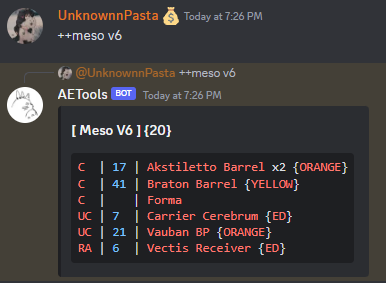
*NOTE*: Blue numbers = stock, C/UC/RA = rarity.
Parts with x2 cost 2 for 1 stock.
ORANGE/etc match the rules explained here.
Part Availability
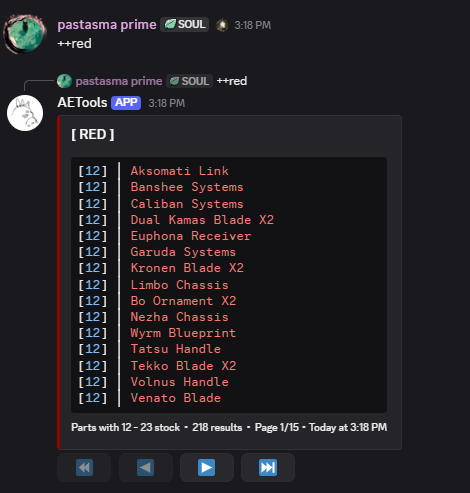
Command Syntax: ++STATUS
Status values: ED / ORANGE / RED / YELLOW / GREEN
Merching
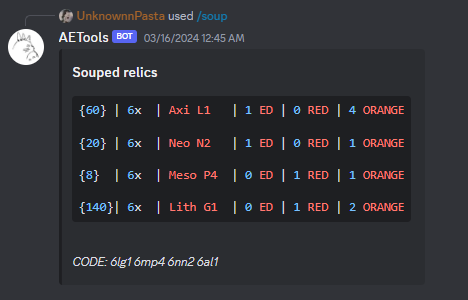
Command Syntax: /soup relics:RELICTEXT *filtermode:TYPE
- relics: e.g.
6lg1 - filtermode: optional filter
- new: colored soup output
Example:

Bot replies with a soup result for posting in merch channels.
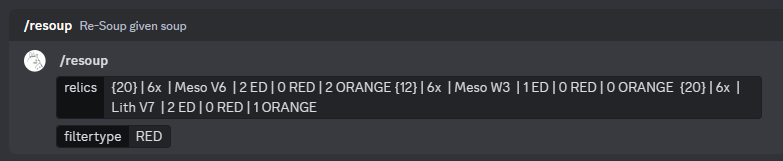
Resouping
Command Syntax: /resoup relics:SOUPTEXT
Prime Lookup
++PRIME→ full prime set++PRIME PART→ specific component
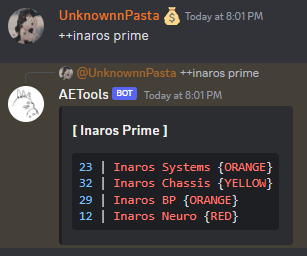
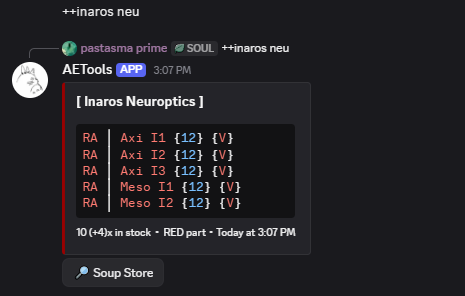
Blue = stock. Parentheses = box stock. Sum = final count.
ORANGE/ED/etc follow the stock rules.
Soup Store Button
Lookups automatically include a Soup Store button.
Examples:
++inaros→ Soup listings for Inaros set++lk4→ Listings for Lith K4 parts
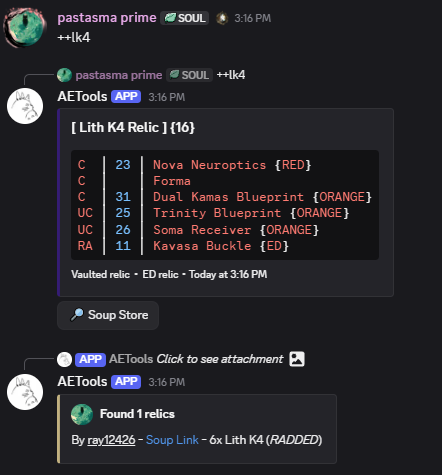
If listings exist, the bot posts them automatically. Otherwise, the page will simply be empty.